Behind the scenes, you might not even notice how your ERP system becomes more and more outdated until a small, everyday task turns out to be a difficult one.
What if your finance department still exports reports to Excel to "understand" them? What if approvals are still in email threads, and no one can keep track of them? A basic change, such as adding a new product category or a tax rule, might take weeks of custom development and back-and-forth with the vendor.
If these situations do ring a bell, you are not the only one. Countless growing companies are still relying on the same old ERPs that were once trustworthy but now slow everything down. However, the good news is that upgrading your ERP doesn't necessarily mean a painful, expensive big-bang approach. By adopting the right method, it can be a well-organised, predictable, and truly beneficial process.
This guide will provide you with a detailed modernisation process for a legacy ERP using Microsoft Dynamics 365 Business Central, without disrupting your daily operations or stressing your teams.
Why Legacy ERPs Start Holding Businesses Back
Legacy ERP systems were designed for a business environment that was very different from today's. They expected stable processes, limited integrations, and on-premise infrastructure. Businesses nowadays demand speed, visibility, and flexibility.
The older systems usually suffer in the following areas:
- Delays or manual reporting
- Integrations with CRM, payroll, or eCommerce tools that are fragile
- Expensive and risky upgrades
- Limited or insecure remote access
- Compliance and audit readiness that require extra effort
Gradually, the teams develop solutions to the problems. These solutions keep the system running, but they also silently increase risk and inefficiency. ERP modernisation is about eliminating hidden friction and enabling your business to grow again.
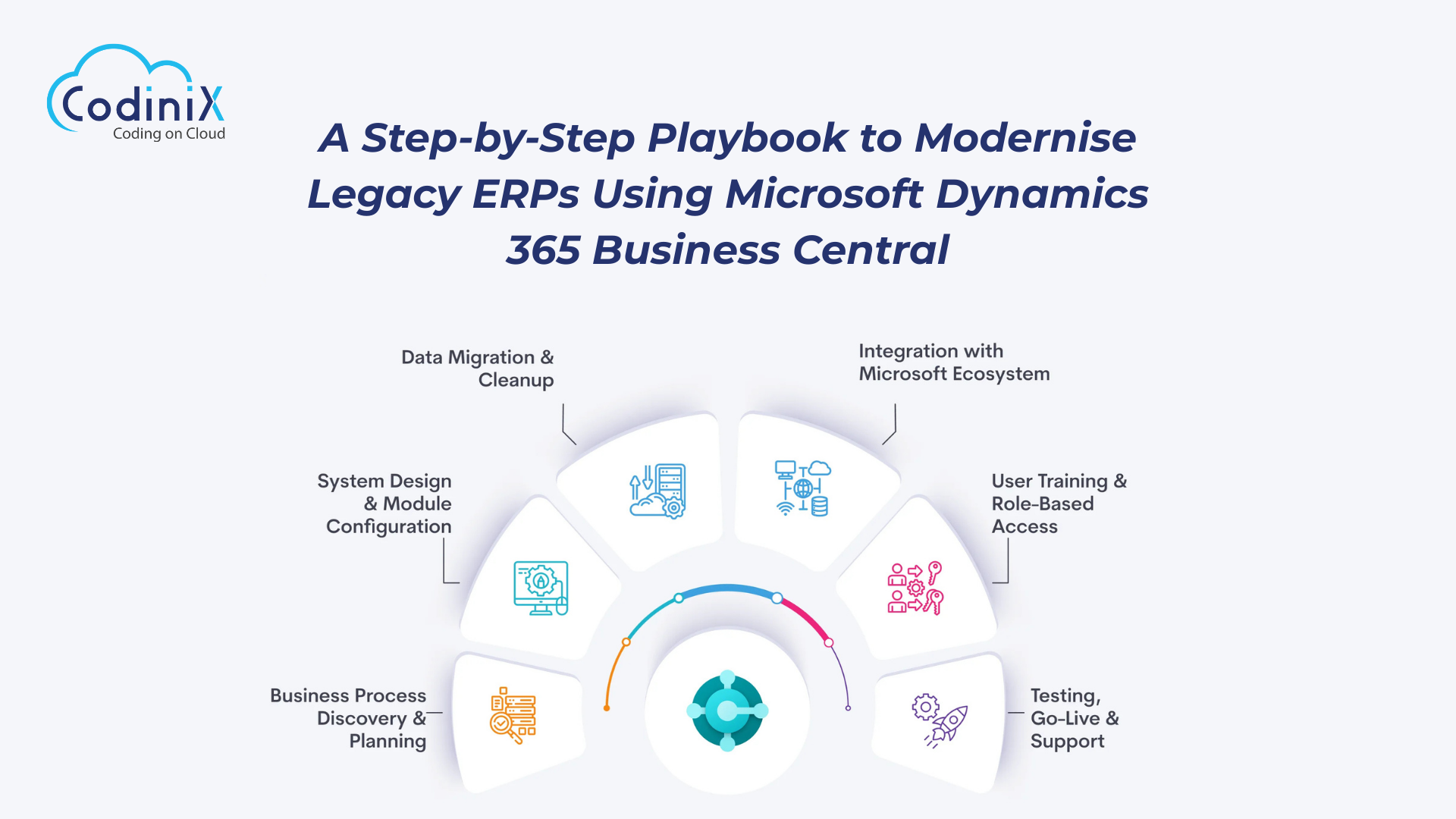
Steps to Modernise Legacy ERPs Using Microsoft Dynamics 365 Business Central
Step 1: Get brutally honest about what's not working
Before exploring any new system, first get clarity.
Bring together your finance, operations, and IT departments and pose some basic questions:
- What are the tasks that require the most time every month?
- Where do most errors or rework occur?
- Which reports are hard to generate but frequently requested by management?
- Which integrations are unreliable or handled manually?
This step does not imply putting the current system on trial. It is all about identifying the real pain points through the system's users every day. Write down these problems clearly. They will serve your Business Central configuration later and avoid redundant customisations.
Step 2: Define what "modern ERP" means for your business
ERP modernisation is definitely not a one-size-fits-all practice. Anyway, the manufacturing company, the distributor, and the professional services firm will set their very different priorities.
The outcomes should be the focus of your attention during that time, rather than the features:
- Faster month-end close
- Real-time financial visibility
- Better inventory accuracy
- Easier compliance and audits
- Scalable processes for future growth
Microsoft Dynamics 365 Business Central is a great fit for this since it is modular. You won't be compelled to activate all components right from day one. Begin with finance and operations, and then branch into supply chain, projects, or advanced reporting as your company grows.
Step 3: Decide what to keep, fix, or retire
The ERP modernisation process has made a major blunder by mindlessly copying the old protocols into the new system.
To make it clearer, apply this straightforward filter:
- Let the processes be effective and still have relevance in the present day
- Correct the processes that function but require simplification
- Quit the processes that the old ERP had made necessary but now serve no purpose
One advantage of Business Central is its set of robust, best-practice solutions. Making these standards the norm usually means fewer customisations, which in turn will facilitate future upgrades.
Step 4: Clean your data before you move it
Data migration is where many ERP projects quietly fail.
Legacy systems often contain:
- Duplicate vendors or customers
- Inactive items and accounts
- Inconsistent naming conventions
- Historical data no one uses
Before migrating to Business Central, decide:
- How many years of historical data do you actually need
- Which master records should be cleaned or merged
- What can be archived instead of being migrated
Clean data not only improves system performance but also builds trust. When users see accurate data from day one, adoption improves dramatically.
Step 5: Plan integrations early, not later
Modern ERPs rarely operate alone. They connect with CRMs, payroll systems, banking platforms, reporting tools, and eCommerce systems.
Business Central integrates seamlessly with the broader Microsoft ecosystem, reducing complexity. Still, every integration should be planned early:
- What data flows in real time?
- What runs on scheduled syncs?
- Who owns integration monitoring?
Early planning avoids last-minute surprises and ensures your ERP becomes the central system of record, not just another disconnected tool.
Step 6: Roll out in phases, not all at once
A phased rollout reduces risk and keeps teams productive.
A typical approach looks like:
- Core finance and accounting
- Purchasing and inventory
- Sales, projects, or manufacturing
- Advanced reporting and automation
Each phase delivers visible value. Teams gain confidence, leadership sees progress, and feedback can be incorporated into the next stage. Business Central supports this incremental approach without technical complexity.
Step 7: Train people in context, not theory
ERP training often fails because it's too generic.
Instead of teaching menus and buttons, focus on real scenarios:
- How finance closes the month
- How purchase approvals flow
- How inventory adjustments are handled
When users see how Business Central simplifies their actual work, resistance drops. Adoption rises not because people are forced to use the system, but because it genuinely makes their day easier.
Step 8: Measure success beyond go-live
Go-live is not the finish line. It's the starting point.
Track success using business outcomes:
- Reduced manual entries
- Faster reporting cycles
- Fewer reconciliation issues
- Improved audit readiness
Business Central's built-in analytics help you monitor these improvements over time. Continuous optimisation ensures your ERP evolves with your business, not against it.
Why Business Central fits modern ERP journeys
Microsoft Dynamics 365 Business Central finds the exact spot that many companies are searching for. It provides order without being overly strict and flexibility without disorder. As it is in the cloud, it minimises hardware and support costs while guaranteeing frequent, non-intrusive, non-disruptive updates.
Besides, Microsoft is the backbone of the product, providing security, scalability, and a powerful, well-established partner network.
However, implementation quality is critical and, at the same time, the platform itself. An experienced ERP modernisation partner like Codinix can ensure that Business Central is not just a box ticked off the tech list but is indeed adapted to the real business needs.
Final thoughts
Modernising a legacy ERP is primarily a matter of momentum instead of technology. It involves eliminating resistance, rebuilding trust in data, and providing tools that support teams' current workflows.
With a well-defined, staged approach and an appropriate platform, Microsoft Dynamics 365 Business Central can turn ERP modernisation from a fearsome, heavyweight project into an uninterrupted, value-based transformation. One that hushes up but still improves operations daily, even after the implementation dust has settled.






























Leave Your Thoughts!!